Real-time intelligence.
No cloud required.
Audrix is a real-time local intelligence engine that captures audio and transcribes it instantly, while also giving you local OCR and Vision to read and analyze any section of your screen. Built for low-latency transcription with configurable noise suppression, automatic crosstalk detection, and support for multiple providers. Everything runs locally, your audio and screen data never leave your machine.
Audio Input → Capture Engine → Audrix Engine → Transcription Model → Real-Time Transcript | Screen Region → OCR/Vision Engine → Instant Text & Analysis
High-performance audio capture with on-screen visual analysis
Raw PCM audio from capture engine → real-time transcription → instant results. No buffering, no waiting. Plus on-screen visual capture and analysis.
Trusted by the Community

"Audrix is a tool that lets you capture sound from your microphone, PC speakers or both at the same time without dealing with complicated configuration. The transcription engine is designed to reduce duplicate words and improve accuracy, even if someone is speaking continuously or multiple people speak at the same time."
Read full review →▶ Overview - Your Audio and Screen, Analyzed Instantly
We needed real-time speech-to-text that respects privacy and runs locally. Existing solutions were either cloud-dependent, too slow, or could not capture system audio. So we built Audrix: a high-performance STT engine, now with built-in OCR and Vision to read and analyze anything on your screen.
About Audrix
💡 Why Audrix? Because Local STT Shouldn't Be Hard!
▶ 🔒 Your Audio and Screen Never Leave Your Machine
- 100% local: All processing on your machine, zero external calls
- No internet required: Works completely offline after initial setup
- Data sovereignty: Your transcripts stay yours, stored locally wherever you choose
- Screen privacy: OCR and Vision analysis runs entirely offline, no screen data escapes
▶ ⚡ Real-Time Performance, Not Batch Jobs
The problem: Traditional STT tools require you to record first, then process later. You lose the ability to react, search, or act on spoken content while it is happening.
How Audrix fixes it: Audrix transcribes audio in real-time as it is captured. See text appear the moment words are spoken, perfect for live captions, meeting notes, or voice commands.
- Low-latency pipeline: Audio captured and processed immediately
- Configurable chunking: Adjustable commit intervals and buffer sizes for your hardware
- Partial results: Get interim transcripts before finalization for faster feedback
▶ 🎤 Mic + System Audio (Loopback) Capture
The problem: Most STT tools only capture microphone input. You cannot transcribe YouTube videos, meetings from Zoom/Teams, or any audio playing through your speakers.
How Audrix fixes it: Audrix captures from both microphone and system audio. Transcribe your voice, any app's audio, or both simultaneously with dual-stream mode.
- Microphone capture: Standard voice input with configurable device selection
- System audio capture: Record any audio playing through your system using standard virtual routing (like VB-Audio Cable)
- Dual-stream mode: Capture mic and system audio simultaneously, with separate speaker labels
- Device selection: Choose specific input devices by system ID
▶ 🎯 Automatic Crosstalk & Noise Suppression
The problem: In meetings or calls with multiple speakers, transcription becomes messy. Background noise and overlapping speech corrupt results.
How Audrix fixes it: Built-in noise gate and crosstalk suppression filters out low-volume noise, and when using dual-stream mode, Audrix can distinguish between the local user (mic) and remote participants (system audio) based on audio characteristics.
- Noise gate: Configurable threshold filters out silence and background hum
- Crosstalk suppression: Dual-stream mode distinguishes user vs remote speakers
- Speaker labeling: Automatic "User" / "Remote" tags in transcripts
- RMS + peak analysis: Dual-threshold detection for accurate voice activity
▶ 🔌 Flexible Backend Architecture
The problem: STT tools lock you into a single model or service. Switching requires reinstalling or reconfiguring everything.
Audrix supports multiple transcription backends through a unified adapter interface. Switch between Whisper, Lemonade NPU-accelerated servers, or external WebSocket endpoints without changing your code.
- Whisper backend: Default high-performance local server
- Lemonade backend: AMD Ryzen NPU acceleration via FastFlowLM
- External backends: Connect to any WebSocket or HTTP transcription server
- Hot-swappable: Change backends at runtime via configuration
▶ Core Features
▶ Audio Capture
Versatile audio capture with extensive configuration options:
Powered by industry-standard open-source audio technology.
- System audio capture: Record any audio playing through your computer, YouTube, Zoom, music, meetings
- Channels: Mono (1) or stereo (2) capture
- Buffer sizes: Adjustable frames per buffer and commit intervals
- Auto-gain: Configurable peak target and maximum gain normalization
- Device selection: Choose specific audio input devices by system ID
▶ Transcription Engine
High-accuracy transcription engine with intelligent merging and analysis:
- Real-time streaming: Continuous transcription as audio arrives
- Smart merging: Word and character overlap detection prevents duplicate text
- Partial results: Interim transcripts with configurable debounce timing
- Language support: Multi-language auto-detection and routing
- LLM analysis: Optional transcript analysis for topics, action items, decisions
- Token-efficient: Prefer completed over delta transcripts to reduce noise
▶ Noise & Crosstalk Handling
Advanced audio preprocessing for clean transcripts:
- Noise gate: Silence detection using peak and RMS thresholds
- Auto-gain control: Normalize audio levels for consistent transcription
- Crosstalk suppression: Dual-stream mode distinguishes user vs remote speakers
- Speaker labeling: Automatic "User" / "Remote" tags in dual-stream transcripts
- Overlap window: Configurable time window (default 3000ms) for crosstalk analysis
▶ Backends & Models
▶ Supported Backends
- Whisper: Default high-performance local server
- Lemonade: AMD NPU-accelerated server (FastFlowLM integration)
- External: Any WebSocket or HTTP transcription endpoint
- Model flexibility: Support for multiple open-source speech recognition models
▶ Lemonade + NPU Acceleration
For AMD Ryzen systems with NPU, Audrix integrates with Lemonade server and FastFlowLM for hardware-accelerated transcription:
- NPU offload: Large speech model runs on Ryzen AI NPU
- Auto-discovery: Automatically finds Lemonade server on localhost:8020
- WebSocket streaming: Real-time transcription via ws://localhost:9000
- Graceful fallback: Falls back to CPU if NPU unavailable
▶ Hardware Requirements
- Minimum: 4GB RAM, any modern CPU
- Recommended: 8GB+ RAM for larger models
- NPU acceleration: AMD Ryzen 7040+ series with XDNA NPU
- Audio device: Standard microphone or any sound card
▶ Audio Capture Deep Dive
▶ Audio Capture
Audrix captures audio directly from your microphone or system output with minimal overhead:
- Low-latency capture: Audio is captured and processed with minimal delay
- Reliable streaming: Stable audio delivery to the transcription engine
▶ 🌐 Setting Up System Audio (VB-Audio Cable Routing)
To correctly capture system audio without losing your loudspeaker output, Windows must be configured to pass the virtual stream back to your hardware. This requires VB-Audio Virtual Cable, a free virtual audio driver from VB-Audio.
1. Install VB-Audio Virtual Cable:
- Download VB-Audio Virtual Cable from the official VB-Audio website.
- Install the driver and reboot if prompted.
2. Configure Windows Sound Routing:
- Open the Windows System Control (Control Panel) and open the Sound settings.
- Switch to the Recording tab.
- Select CABLE Output and open its Properties.
- Navigate to the Listen tab.
- Check the box for "Listen to this device".
- In the dropdown menu, select your physical Loudspeaker. (This hooks the cable output directly to your speakers so you can hear everything normally while the cable grabs the sound).
3. Configure Audrix:
In the Audrix device selection, simply select Cable Input (VB-Audio Virtual Cable) to grab and transcribe the system audio stream.
🎯 Result: System audio flows straight into the virtual cable for Audrix to grab, while simultaneously passing through to your loudspeakers so you do not miss a beat.
▶ Configuration Options
- Sample rate: Default 16000 Hz for optimal transcription quality, adjustable
- Frames per buffer: 11025 default (configurable for latency/CPU trade-off)
- Commit interval: How often to send accumulated audio to transcriber
- Overlap buffers: Continuity between chunks for better word boundary detection
- Auto-gain: Peak normalization with configurable target (default 0.25)
- Silence thresholds: Peak (0.015) and RMS (0.003) for voice activity detection
▶ Vision & OCR
▶ Screen OCR & Vision Analysis
Beyond audio, Audrix includes local OCR and Vision capabilities to instantly read and analyze any section of your screen. Select a region, capture it, and get text extraction or visual analysis immediately. No cloud uploads, no API keys, no waiting.
- Local OCR: Extract text from any screen region in real time
- Vision analysis: AI-powered understanding of on-screen content, diagrams, UI elements
- Region selection: Click and drag to capture any portion of your display
- 100% offline: Every OCR and Vision model runs entirely on your machine
▶ Setup
Your audio and screen deserve an intelligence engine that actually works for them. Download Audrix today. Runs fully offline, no cloud. Build a personal speech-to-text workspace that gets smarter every time you use it.
Version 1.0.2
No installation required for portable version. Your data stays on your machine.
▶ System Requirements
| Component | Minimum |
|---|---|
| OS | Windows 10/11 (64-bit) |
| CPU | Modern x64 processor |
| RAM | 4 GB |
| Storage | 2 GB (app + model) |
| Audio | Standard microphone or any sound card |
| Optional NPU | AMD Ryzen 7040+ with XDNA (for Lemonade backend) |
▶ Support & Community
Join our Discord community
▶ Discover
▶Sorana - Your Personal AI That Actually Knows You
Sorana is your personal AI knowledge workspace, a second brain that actually acts. Unlike chatbots that forget you the moment you close the window, Sorana builds a lasting memory of your projects, files, and thinking style. Open it tomorrow and it already knows where you left off. Visualise your entire knowledge base on a spatial 2D canvas (like Obsidian Canvas, but AI-powered), chat with any document in plain language, and let your AI handle repetitive tasks, organising files, researching topics, managing emails, all without leaving your workspace. Everything runs on your machine. Your data stays yours.

▶TabNeuron - AI Spatial Tab Manager & Research Workspace
TabNeuron breaks your browser tabs out of the tab bar and maps them onto a 2D canvas. AI automatically groups them by content, you can chat with any page or the live internet, deploy no-code research agents, and sync your layout back to Chrome Tab Groups, all from a portable desktop app that runs fully offline with a built-in model.

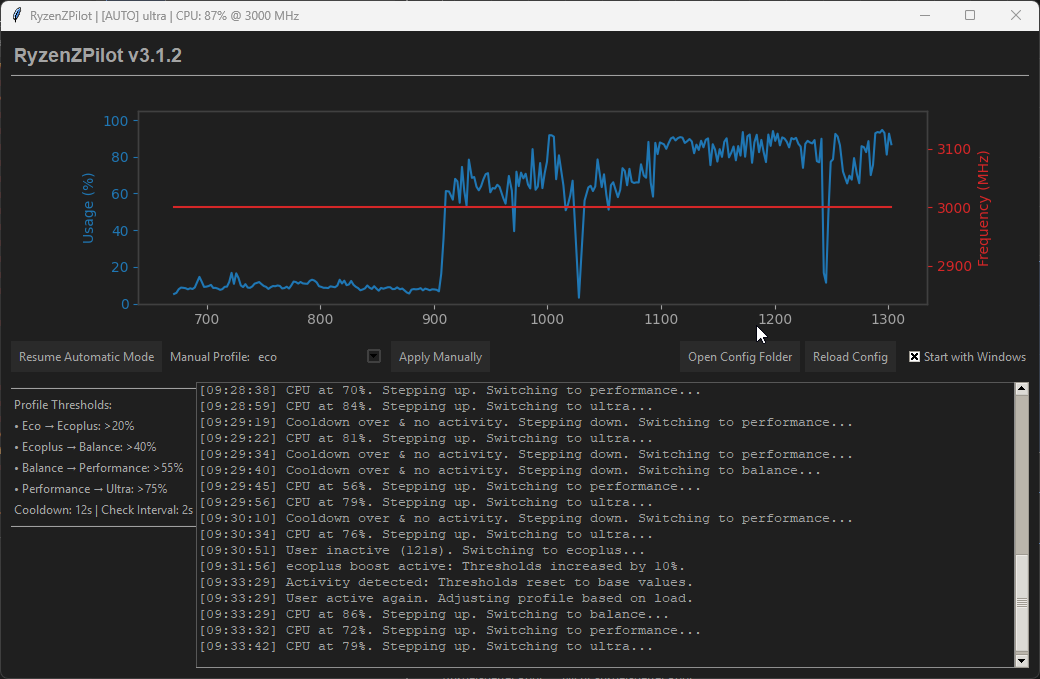
▶RyzenZPilot - AMD Ryzen Power Management Tool
RyzenZPilot is a powerful tool for managing AMD Ryzen processor power settings on Windows. It allows users to adjust CPU performance, power limits, and thermal configurations for optimal performance and efficiency.
Website
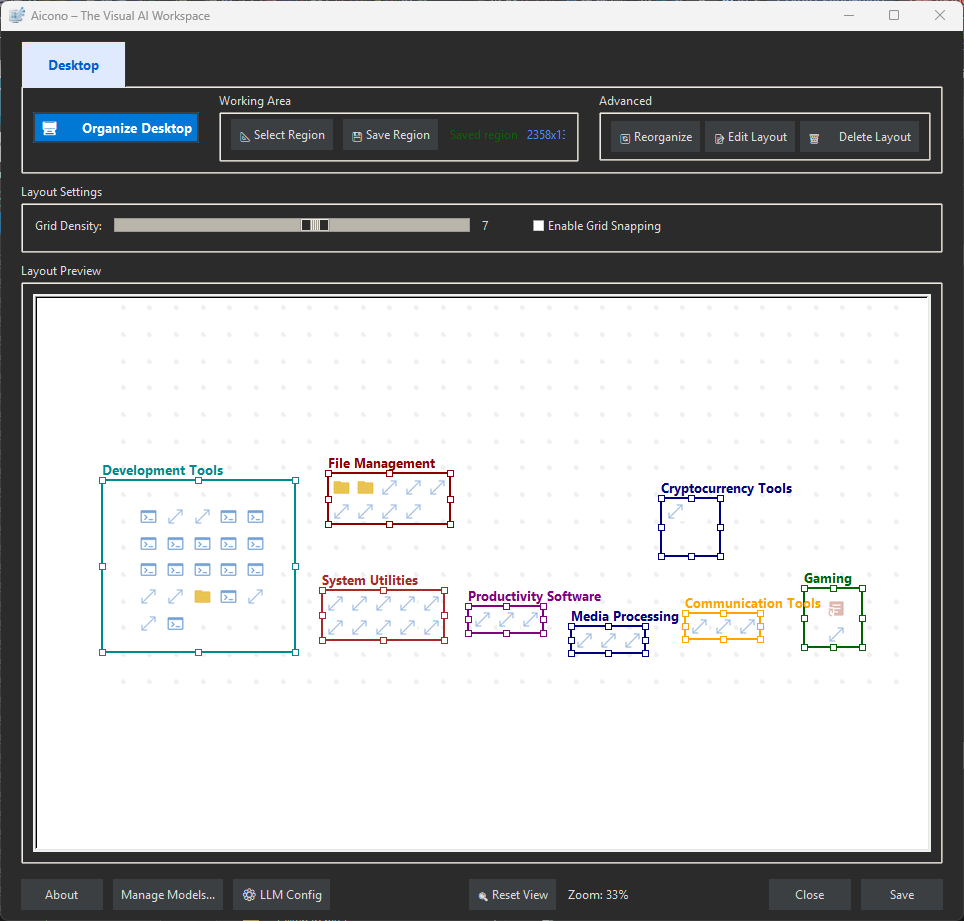
▶Aicono - AI Intelligent Desktop Icon Autopilot
Aicono automatically organizes your cluttered Windows desktop using AI. Group icons intelligently, arrange them neatly!
Website
▶Featured on Microsoft Store

▶Featured on Softpedia

▶Featured on AlternativeTo
▶Featured on Product Hunt

A free community build is available. Session duration is capped at 30 minutes with cooldown periods between uses.