The desktop AI knowledge workspace.
That never forgets.
Sorana is a personal desktop AI knowledge workspace and agent harness: it learns from your documents, conversations, and actions and uses that memory to chat, dispatch AI agents, manage email and calendar, browse the web, and run local models all in one private workspace. Give it a goal and the harness plans the steps, dispatches specialized subagents, acts with 90+ tools, and reviews its own work. It runs on your machine and never forgets a project, preference, or decision.
A portable desktop app: runs from a USB stick. No install, no account, no cloud sync.
Available for Windows, Linux, and MacOS.


The Sorana Model Manager: browse, collapse, sort by provider, name, or capability, mark favorites, and activate models from every major provider in one unified interface.
How Sorana works.
Give your workspace a goal. This is the harness loop: Sorana plans the work, dispatches specialized subagents, web research, and code analysis, acts across your files, email, calendar, and knowledge base, then reviews the results. All on your machine.
Plan
Breaks your goal into ordered steps, picks the right tools and models for each part, and decides what can run in parallel.
Dispatch
Sends specialized subagents, web research, code analysis, fact-check or review, to work on parts in parallel, each with its own budget and scope.
Act
Runs the steps across your files, web, email, and calendar. The primary agent stays in control while specialized workers handle their assigned parts.
Review & correct
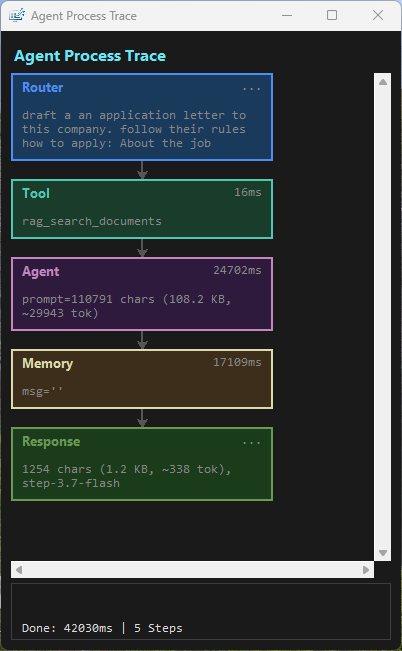
Checks its own results, retries on failure, then assembles the final answer. You see the full trace of what was done and why.

Sponsored
Your knowledge. Your harness. Your rules.
Sorana is a personal desktop AI knowledge workspace and agent harness that learns from your documents, conversations, and actions and uses that memory to help you work across your files, web, email, and calendar.
Sorana is a desktop AI knowledge workspace. It learns from every conversation, file, and preference, building a lasting memory of your projects and thinking style. Open it tomorrow and it already knows where you left off. When a task needs it, Sorana dispatches specialized subagents to work in parallel then reviews the results before answering.
Visualize your entire knowledge base on a spatial 2D canvas, chat with any document in plain language, and let your AI handle repetitive tasks. Organize files, research topics, manage emails and your calendar, all without leaving your workspace.
Everything runs on your machine. Your data stays yours.
Sponsored
Why Sorana? Because your workspace should know you.
Common AI frustrations and how Sorana solves them.
Your AI can't think strategically
Most AI does one thing at a time. Sorana breaks a goal into steps and dispatches specialized subagents, research, code, and fact-check when needed all from one workspace, with full review of the results.
You re-explain yourself every day
Sorana learns from every conversation, project, and preference. Next time you open it, you pick up exactly where you left off.
Your AI talks but can't act
Tell Sorana what to do in plain language. It organises files, searches the web, and manages Gmail and Calendar from one conversation.
Your knowledge lives on someone else's server
Sorana runs AI models locally. Your notes, files, and conversations never leave your machine unless you want them to.
Long conversations get slow and expensive
Sorana quietly condenses older parts of a conversation while keeping the important context, so even long-running projects stay fast and easy to continue.
Your powerful model is wasted on simple tasks
Sorana uses a fast model for simple steps and a stronger one when the task needs deeper thinking, so you get capable answers without wasting resources.
You need a different working style
Choose a ready-made working style for research, writing, planning, or everyday work, then switch whenever the task changes.
Half your knowledge is locked in PDFs and images
Built-in OCR and vision AI make scanned documents, screenshots, and images searchable and ready to discuss.
Your AI is a black box
Sorana makes its work visible: see what it searched, what it found, and why it reached an answer. You stay informed instead of treating the result like a black box.
A smarter way to work.
Everything you need in one workspace and agent harness: chat with documents, dispatch AI agents, manage email and calendar, browse the web, and run local models, all with persistent memory that learns from every interaction.
Agent harness: parallel subagents with budgets
When a task needs it, Sorana's harness loop dispatches specialized subagents, web research, code analysis, and fact-check to work in parallel, each with its own budget. The workspace reviews the results before you see the answer.
Command it in plain language
Get clear, easy-to-scan answers instead of a wall of text. Sorana highlights what matters, keeps explanations separate from the final answer, and turns comparisons into clean, readable tables.
The right AI for every task
Sorana chooses a quick model for simple jobs and a more powerful one for difficult questions, keeping your workspace responsive while giving important work the attention it deserves.
A provider dies? Keep working.
Assign a backup model per role and one global spare. When a provider hits its limit or goes down mid-chat, Sorana switches to a healthy alternative automatically and benches dead free tiers until they reset.
Make the AI work your way
Assign any model to five role slots: Primary (your main model), Quick (fast answers), Embed (indexes your documents for search), Vision (reads images and scans), and Reviewer (a second opinion on answer quality), then switch whenever the task changes. The Reviewer gives answer quality checks an independent second opinion on a different model, while everything else keeps running as before.
Know what your AI can do
Check whether a model can handle images, audio, or deeper reasoning before you depend on it. Choose with confidence instead of discovering limitations halfway through a task.
Memory that grows with you
Sorana remembers the facts, preferences, and project details that matter to you. Keep knowledge tied to one project or available when you need it, so you spend less time repeating yourself.
Visual knowledge canvas
See your files arranged by topic on a 2D canvas. Drag, drop, resize, and generate mind maps to reveal hidden relationships.
Ask about any file
Ask questions about PDFs, documents, scans, and images in plain language. Sorana finds the useful information inside and makes your whole archive easier to search.
Answers grounded in your knowledge
Bring together documents, notes, and web pages in one searchable knowledge base. Sorana finds the right context automatically, so answers are based on your information, not guesswork.
Every answer shows its sources
Web search results list which pages were actually used. Document answers show which files were retrieved. Sources are filtered by relevance so you only see what mattered, not noise.
Learns your preferences
When you decline a proposed action, the agent remembers the pattern and adapts future suggestions to your preferences instead of repeating them.
Projects canvas NEW
A second canvas beside your Workspace: every project gets its own card, its own assistant, its own folder the app looks after, and its own notes. Right-click the canvas to start a project, right-click a card to chat with it. Each canvas keeps its own view, zoom, and grid density.
Ready to try it?
Download the executable and run it directly. No installation, no account, no cloud sync unless you choose it.


One workspace. Every tool.
Sorana connects to extra tools and services through MCP servers. Built in servers work out of the box and cover memory, files, web search, Gmail, Calendar, your past chats, and ListenBrainz music history. The marketplace adds external servers, from the ToolForest aggregator with 30+ toolkits over a single connection to single service servers for Drive, GitHub, Slack, Postgres and movies. Everything is managed from the MCP Manager with no config files.
Chat with your music history NEW
ListenBrainz is now a built-in server with 12 tools. Ask for the sitewide top artists, your own most played artists, what is playing right now, or your last 100 listens. For the deep questions, request a full history export: Sorana queues it as a background job, imports the archive locally, and then answers across years of listening with range queries, per artist history, and forgotten artists rediscovery.
ToolForest: 30+ toolkits, one connection NEW
ToolForest is a hosted MCP aggregator. One remote connection, nothing to install. Add your API key, authorize toolkits at app.toolforest.io, and Sorana discovers tools step by step. First it lists toolkits, then tools, then schemas, then it executes. Its tools are separate from the built in Gmail, Calendar and ListenBrainz servers.
Toolkits grouped in domains:
Highlights: Polymarket with public odds and price history and no account needed. GDELT with rolling global news and coded events with tone and geography and no key needed. Plus Gmail, Sheets, Reddit, X, Fitbit, Anki and GitHub toolkits.
Built-ins included
Memory that never forgets · Files you can read, write and search · Web search · Gmail and Calendar actions · Your past chats. All managed from the MCP Manager with no config files.
Marketplace servers for Drive, GitHub, Slack, Postgres and movies are under construction and need manual auth. ToolForest covers most of that ground today.
See what you can do with Sorana.
Your workspace connects research, memory, files, email, and calendar. One request can plan, execute, and verify multi-step work across all of them.
Workflows & Pipelines
- "Draft a project report, review it for gaps, and polish the final version"
- "Research this topic, write a blog post, and have a second agent fact check every claim"
- "Read these requirements, draft a technical spec, and review it for clarity"
- "Analyze this customer feedback, summarize the key themes, and draft a response plan"
- "Review this code change for bugs, suggest improvements, and generate a summary. Run the review in parallel with the analysis."
Memory & Knowledge
- "Remember that my preferred working hours are 9am to 4pm"
- "What did I learn about project budgeting last week?"
- "Research electric car trends and save the key facts so I can find them later"
- "Read this research paper and save the key findings to my notes"
- "Compare what I know about option A versus option B from past research"
Research & Writing
- "Summarize this document for me"
- "Read these three articles and draft a summary memo, then save it to my project folder"
- "Find relevant studies on this topic and add them to my knowledge base"
- "Search my notes for the client meeting summary and send a follow up email"
- "Organize this folder of research papers into topic groups and summarize each one"
Tasks & Scheduling
- "Send an email to the team about the project update"
- "What meetings do I have today?"
- "Review the project brief, draft a response, and add the deadline to my calendar"
- "Find free slots this week and schedule a call with the team"
- "Search my emails for invoices from last quarter and archive them to a folder"
Job Hunting
- "Research company ABC and save the key facts for my interview"
- "Tailor my CV for this job description and save both versions"
- "Draft a cover letter for this application"
- "Send a follow up email after the interview"
- "Find interview tips for this role and add them to my notes"
Email & Calendar
- "Find all unread emails from yesterday"
- "Send a reply to the thread about the conference"
- "Create a new event for next Tuesday at 3pm"
- "What does my week look like?"
- "Archive all emails from last month with label Projects"
Files & Documents
- "Show me all files in the project folder"
- "Rename report_draft.docx to report_final.docx"
- "Find all PDFs created this week"
- "Create a new folder called Budget 2026"
- "Copy the meeting notes to the shared folder"
Household & Personal
- "What bills are due this month?"
- "Compare internet plans from local providers and save the best option"
- "Scan this letter and extract the important details to my knowledge base"
- "Search my archives for the insurance policy and summarize the coverage"
Sponsored
How Sorana compares.
Compare Sorana with note apps, cloud assistants, and other self-hosted AI workspaces.
| What you get | Sorana | Odysseus | Obsidian / Notion | ChatGPT / Claude / others |
|---|---|---|---|---|
| Native desktop app. Runs fully offline & private | Native portable app for Windows, Linux, and MacOS. Runs on your machine with your data. Cloud only when you explicitly connect an API key. | Self-hosted web app. Local-first and no telemetry. | Obsidian local-first. Notion cloud-hosted. | Cloud-only. Your data on their servers. |
| Model flexibility | Cloud and unlimited local models via Lemonade, Ollama, Llama.cpp, and LM Studio. 25+ providers plus capability probing on any model. Browse, favorite, and probe before you commit. | Bring your own models. Local or external endpoints with 270+ catalogued models. | No native AI. Optional plugins connect external providers. | One vendor per service. Limited switching between models. |
| The right AI for each task | Assign any model to five role slots (Primary, Quick, Embed, Vision, Reviewer) with Backup or Spare per role for automatic failover. | Choose local or external endpoints. Compare several models side-by-side. | Single model per plugin or integration. No role-based routing. | One model per session. Stronger models require plan upgrade. |
| Provider goes down or hits quota | Automatic failover to your Backup or Spare model. Dead free tiers pause until reset. | Endpoint and model choice is manual. No failover behavior described. | Depends on plugin or provider. No automatic failover. | Wait, upgrade, or switch manually. |
| Multi-agent orchestration | A primary agent plans your work, dispatches specialized subagents in parallel, and reviews their results before answering. | Autonomous agents plan, call tools, and work through tasks. | Simple automations and community plugins. | Basic workflows and skills available with paid plans. |
| See how answers are built | See the full trace of every step planned, searched, and reviewed to reach the answer. | Agent tracing is not described on the current site. | Plugin-dependent transparency. Limited by design. | Agent tracing varies by service and plan. |
| Sources you can verify | Every answer lists the web pages and documents it used, with relevance-filtered citations you can verify. | Deep Research gathers, reads, and cites sources. | Plugin-dependent citation support. | Citations vary by service and plan. |
| Portable | Portable executable for Windows, Linux, and MacOS. Runs from a USB stick with no installation, no account, and no registry changes. | Self-hosted web app. No portable-desktop claim. | Obsidian local files. Notion requires account and sync. | Cloud and web only. Limited desktop applications. |
| AI takes action | Built-in automation across files, web, email, and calendar. | Tools, MCP, email, research, and autonomous agents. | View and edit. Limited native AI actions. | Paid connectors with separate setup. |
| Goal-driven autonomy | Plans multi-step work, dispatches specialized subagents in parallel, acts with 90+ tools, and reviews its own work before answering. | Autonomous agents plan, call tools, and work through tasks. | Workflow plugins available. No native autonomous agent. | Agent modes and workflows available with paid plans. |
| Visual knowledge canvas | AI-organised 2D spatial canvas for visual knowledge management. | Visual canvas is not described on the current site. | Obsidian Canvas (manual). Notion database views. | Chat-first interface. Canvas features limited or absent. |
| Chat with documents | Chat with hundreds of papers, books, and scanned notes across your whole workspace. | Document editor. Document-chat scope is not described. | Community plugins for document chat. | Project uploads and per-session context. |
| Image OCR & Vision AI | Built-in OCR with AI vision fallback for images and documents. | Image gallery. OCR and vision are not described. | External tools or plugins required. | Vision features vary by service. |
| Tool integrations | Built-in MCP servers (memory, files, web search, Gmail, Calendar, ListenBrainz music history) plus the ToolForest aggregator with 30+ toolkits over one connection. | Built-in tools plus any MCP server you connect. | Plugin marketplace. No native AI agents. | Connector marketplaces vary by service. |
| Calendar & Scheduling | Manage Gmail and Calendar through natural chat. | Calendar and scheduling are not described. | View-only calendar plugins. | Calendar connectors vary by service. |
| AI remembers you | Persistent memory that remembers your projects, preferences, and decisions. | Persistent memory across all conversations. | Manual notes and tags. No persistent AI memory. | Memory features vary by service and plan. |
| Stays useful over months | Quietly condenses older conversations while keeping the important context for months of continued work. | Persistent memory across conversations. Retention period not stated. | Manual organization. No AI context retention. | Context retention varies by service. |
| Cost | Free to use. $0/mo with free-tier cloud models or local models. Your choice. | Open source and free. Self-hosted. | Free tier available. Paid tiers for collaboration and sync. | Subscription pricing varies by model and provider. |
*Publicly disclosed approximate cost as of 2026; Sorana lets you use those same models without subscription if you already have API credits, or swap in free-tier and local models instead. Odysseus cells reflect its public website as checked on 2026-09-09; "not described" means the current site does not claim that capability.
Trusted by the community.
Reviewed and recommended by publications across the AI and software space.

"A smart, slightly odd, and genuinely interesting Windows tool for organizing files with AI. The canvas, document chat, OCR, and local AI support give it a real purpose."
Read full review →
"A fresh and innovative approach to personal knowledge management. The spatial canvas and persistent memory features set it apart from traditional note-taking apps."
Read full review →
"A capable, memory-persistent, privacy-respecting AI workspace that fits on a USB drive and costs nothing to run."
Read full review →
"An innovative AI-powered visual workspace that revolutionizes the way individuals and teams organize, process, and interact with digital files."
Read full review →
"Redefines digital organization by transforming traditional file management into an intelligent, visual AI workspace. Replaces rigid folders and forgetful chatbots with a persistent 2D canvas."
Read full review →
"A bold step in the evolution of file organization tools, a free AI-powered visual workspace whose canvas, document chat, OCR, and flexible local or cloud AI support set it apart from traditional file management."
Read full review →Sponsored
Built for knowledge workers.
Researchers, writers, consultants, students, job hunters, and anyone managing personal admin, landlords, energy, telecom, repairs, doctors, banking, and more.
No matter your role, the same core toolkit works for you: ask questions across your documents and files, research the web, manage Gmail and Calendar, and switch the AI’s working style for any task. Because you can keep everything local and use private models, it is just as useful for sensitive everyday tasks as it is for work.
Researchers & academics
Chat with hundreds of papers, books, and scanned notes in one place.
Writers & journalists
Build a living reference library that remembers your style, sources, and ideas.
Consultants & freelancers
Maintain full AI context across multiple long-running client projects.
Students
Turn notes, PDFs, and lecture slides into a personal knowledge base you can talk to.
Job hunters
Learn about companies and hiring teams on the web, then use your own files and notes to tailor your CV and cover letter. Draft applications and follow-up emails, save everything, send them straight from Gmail, and add interviews to your calendar.
Household & personal admin
Manage landlords, energy, telecom, repairs, doctors, and banking. Keep sensitive letters, bills, and health records off the cloud by switching to private, local models.
Obsidian & Notion users
Add an AI layer that learns from your vault and can act on it.
Privacy-conscious professionals
Full AI power with zero data leaving your machine.
Coders & programmers
Search, read, and analyze any codebase through conversation. Understand your projects like a teammate who already knows the code.
Sponsored
Supported providers
Cloud Providers
 OpenAI
 Nvidia
  Mistral
  Google (Gemma)
  Meta (Llama)
 DeepSeek
 Qwen / Baidu
 HuggingFace
Local models
A taste of what's inside.
30+ free cloud models from every major provider, plus unlimited local models.
Get started in minutes.
Download and run. No installation required.
Download
Grab the latest executable from GitHub. Run it directly from any folder, even a USB drive.
Choose a model
Use a free cloud model with your own API key — including OpenRouter's free tier — or run local models through Lemonade, Ollama, or LM Studio.
Start working
Add your files, then give Sorana a goal. It plans the steps and works through them across files, web, email, and calendar — while remembering your projects and preferences.
Need help?
Join the community, leave a review, or support the project.
Community
Join the Discord server to ask questions, share workflows, and get help from other Sorana users.
Join DiscordFeedback
Have a question, suggestion, or bug report? Open a discussion or issue on GitHub.
GitHub FeedbackSupport development
Donations via PayPal or Bitcoin Cash help keep the project moving. Visit the support page for all options.
Support & DonateFeedback on AlternativeTo
Leave feedback on AlternativeTo to help others discover Sorana.
AlternativeTo FeedbackFeedback on MajorGeeks
Leave feedback on MajorGeeks to share your experience and help others discover Sorana.
MajorGeeks FeedbackFeedback on Softpedia
Leave feedback on Softpedia to let other users know what you think.
Softpedia FeedbackSimple pricing.
Sorana is fully free today. A planned premium option is coming for users who want extra support.
Free
Unlimited use during public preview. Bring your own API key or run local models. No account, no trial clock.
Premium Support & Early Access
Optional paid tier. Priority setup help, early access to new integrations, and direct feedback channel. All current features remain available in the free tier.
Not yet available. Join Discord for updates.
Join Discord for updatesSponsored
Discover more apps.
Other tools from Tetramatrix for productivity, gaming, and AI-powered workflows.

Audrix
Real-time speech-to-text engine. Capture microphone or system audio, transcribe instantly with noise suppression and crosstalk detection. Runs entirely offline on Windows.

TabNeuron
AI Spatial Tab Manager & Research Workspace. Maps browser tabs onto a 2D canvas, AI groups them by content, chat with any page or the live internet, deploy no-code research agents, and sync back to Chrome Tab Groups.

RyzenZPilot
Powerful tool for managing AMD Ryzen processor power settings on Windows. Adjust CPU performance, power limits, and thermal configurations.

Aicono
AI Intelligent Desktop Icon Autopilot. Automatically organizes your cluttered Windows desktop using AI. Group icons intelligently, arrange them neatly.
Common questions.
Quick answers before you download.
Is Sorana a desktop AI knowledge workspace and agent harness?
Yes. Sorana is a personal desktop AI knowledge workspace and agent harness that runs natively on Windows, Linux, and MacOS as a portable executable. No browser, no account, no installation. It works on your local files and only uses cloud providers when you explicitly connect an API key. Inside the workspace, you can chat with documents, dispatch AI agents, manage email and calendar, browse the web, and run local models.
Does Sorana cost anything?
Sorana is free to download and use today; a planned premium option will add extra support while all current features remain available in the free tier. You can pair it with free cloud models (OpenRouter, Nvidia, Mistral, etc.) using your own API key, or run completely offline with local models via Lemonade, Ollama, or LM Studio — OpenRouter's free tier is a zero-cost way to start with cloud models.
Does my data leave my machine?
By default, everything stays local. Sorana runs on your machine and stores its workspace data in a local .sorana/ folder. Cloud providers are only used when you explicitly connect an API key.
Can I run it from a USB stick?
Yes. Sorana is a portable executable. Run it directly. No installation, no registry changes, no admin rights required.
What models are supported?
25+ providers including OpenAI, Grok, OpenRouter, Mistral, DeepSeek, Nvidia, Google, Meta, Alibaba, and more. Local models run through Lemonade, Ollama, Llama.cpp, or LM Studio. The Model Manager lets you browse, favorite, and probe models to discover their capabilities.
Which providers have free tiers?
Several providers let you use AI models for free. Here is how each one works:
OpenRouter is the easiest way to start. Sign up at openrouter.ai, grab a free API key (no credit card needed), then open Sorana's Model Manager, find "openrouter/free", and set it as your Primary model or for all roles if you don't have other models. OpenRouter automatically picks top-rated free models from its catalog for every request.
FreeRouter is free to use. Sign up at freerouter.eu.cc, get a free API key (no credit card), then open the Model Manager, select "Kiro Auto", and start chatting. It is 100% free with no limits.
Nvidia offers multiple models for free, including nemotron-3-super-120b. Sign up at build.nvidia.com, grab an API key, and add it in the Model Manager under Nvidia. Browse all free models at build.nvidia.com.
Mistral offers devstral-2512 for free. Create an account at mistral.ai, grab your API key, and connect it in Sorana's Model Manager.
Google offers Gemma models for free. Get an API key at ai.google.dev and add it under Google in the Model Manager.
All of these are free. No credit card is required for any of them. You can try them all and see which one works best for your needs.
Is Sorana really an autonomous AI agent?
Yes. Give Sorana a goal and it plans the steps, picks the right tools, and works through them on its own. Reading files, searching the web, and querying your knowledge base happen automatically. Writes to your filesystem and external actions like email and calendar pause for your approval first, and you decide per action, and you can set persistent allow/deny rules. Every step is traceable in the agent trace, and nothing leaves your machine unless you connect a provider.
Does Sorana use multiple AI agents?
When a task needs it, Sorana dispatches specialized subagents: a web researcher, a code analyst, a fact-check or review agent each with its own budget, running parts of the work in parallel. The workspace assembles and reviews the results before answering.
Is Sorana an agent harness?
Yes. A harness is the runtime that turns a model into an agent: it reads files, runs tools, keeps a plan, and keeps working. Sorana is a private desktop harness — give it a goal and it plans the steps, dispatches specialized subagents in parallel with per-agent budgets, acts across files, web, email and calendar with 90+ tools, and reviews its own work. It is model-agnostic (25+ cloud providers plus local models) and everything runs on your machine.
How do I chat with my music history?
Enable the built-in ListenBrainz server and paste your ListenBrainz user token in the Configure dialog. Then ask for top artists, now-playing, or recent listens directly. For full-history questions, ask for an export: Sorana queues it as a background job, imports the archive locally, and answers across years of listening.
What does ToolForest add?
ToolForest is a hosted MCP aggregator with 30+ toolkits over a single connection — Google Workspace, prediction markets like Polymarket, global news via GDELT, Reddit, X, fitness trackers, flashcards and more. Add your API key, authorize toolkits at app.toolforest.io, and ask normally. Its tools are separate from Sorana's built-in Gmail, Calendar, and ListenBrainz servers.
What happens to long conversations?
Sorana quietly condenses older parts of a conversation while keeping the important context, so conversations that span weeks or months stay fast and easy to continue.
Sponsored
Start using top-rated free models today.
Download Sorana and get instant access to 30+ free models from every major provider. Private by design and built for serious AI work.
openrouter/free100% FREE OpenRouter · free API key, top-rated free models Browse free models →
Kiro Auto100% FREE FreeRouter · no credit card Get a free key →
GPT · Claude · GeminiCHEAPER API CheaperInference · cheaper API Compare prices →